A faint hum from a charger can be unsettling, especially in a quiet bedroom or beside your desk. If you are asking, “why is my charger making a humming or buzzing noise,” the sound may come from tiny electrical components vibrating as they convert power. A soft, steady noise can occur with some chargers. Still, a new, sharp, or unusually loud buzz deserves attention. Sound alone cannot confirm what is wrong.
Start with the details you can check safely. Notice whether the noise changes when you charge another device, use a different wall outlet, or remove the cable. Look for a loose plug, cracked casing, frayed wire, or scorch marks. Is the charger warm, or genuinely hot? That difference matters. Unplug it if you notice a burning smell, sparks, visible damage, or excessive heat, and do not open the adapter. A qualified technician or the charger’s manufacturer can assess persistent problems more reliably than guesswork.
The seven tips in this guide explain common causes, from a poor connection to a failing adapter, and show what to try next. Many cases have a simple explanation. Some do not. It is easy to blame the phone, but the outlet, cable, or charger may be involved. Use a known-good, compatible charger for comparison, and stop using any adapter that behaves unpredictably. A little caution is sensible; ignoring clear warning signs is not.
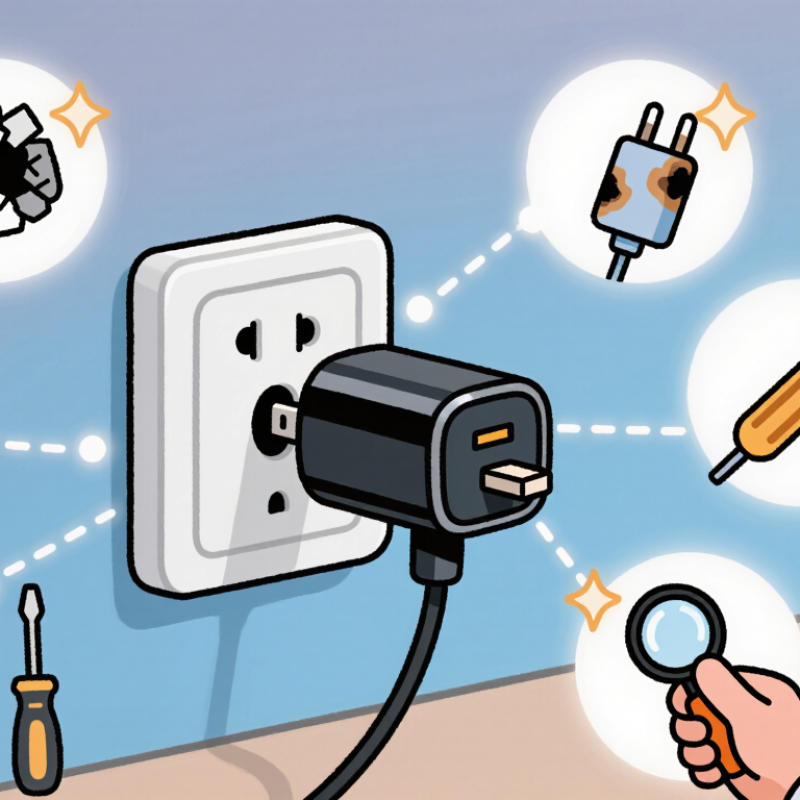
A humming or buzzing charger usually makes a low, steady sound, like a faint electrical drone near a wall outlet. Some chargers also produce a thin, high-pitched whine, especially while powering a device. The noise may change when the battery is nearly full or the device is working hard. From across a quiet room, it can seem louder than it really is. Sound alone cannot confirm a fault.
Tip: Listen from a safe distance. Note whether the noise is constant, pulsing, or only present when a device is connected. Unplug the charger, then check its casing and cable for cracks, looseness, or unusual warmth. A quiet hum can be normal, but it should not be ignored automatically.
A sharp crackle, sizzling noise, burning smell, or excessive heat is different from a soft hum. Stop using the charger and unplug it if you can do so safely. Do not open the casing or try to repair internal parts. It is easy to overread a faint buzz, and noise varies between chargers; still, a new or worsening sound deserves attention. If the outlet itself also buzzes, have it checked by a qualified electrician.
A faint hum can come from a charger’s switching components. Tiny magnetic parts may vibrate as power changes inside the adapter. This is sometimes called coil whine, and it may become more noticeable when charging a device or using a different outlet. A loose plug or worn outlet can also create a buzz. Listen closely: does the sound come from the charger, or the wall?
Tip: Unplug the charger and check its casing, cable, and plug for cracks, discoloration, or unusual warmth. Try a sound, undamaged outlet, and notice whether the noise changes. Chargers can hum slightly under load; that does not automatically mean they are failing. Still, I wouldn’t ignore a new or growing buzz. Small noises are easy to dismiss.
Tip: Stop using the charger if it smells burnt, feels hot, sparks, or makes a loud, irregular sound. Unplug it by holding the plug, not pulling the cable. Don’t open the casing; internal parts can retain charge. If the sound follows the charger to another outlet, replace it with a compatible, safety-certified unit. If it happens only at one outlet, have that outlet checked by a qualified electrician.
A faint, steady hum can come from the charger’s internal electronics, especially while a device is drawing power. A new, loud, or uneven buzz deserves attention. Listen from a safe distance; do not press your ear against the adapter. Check whether the sound changes when the device is disconnected. If it continues, the charger itself may be the source.
Look for other warning signs. Is the adapter unusually hot, discolored, cracked, or giving off a burnt smell? Do you hear crackling, or see sparks? Stop using it. Unplug it by gripping the plug, not the cable, if the plug and outlet appear safe to touch. A warm charger can be normal; too hot to hold comfortably is not. Inspect the cable for fraying and the outlet for looseness or scorch marks. Don’t open the charger or keep testing one that smells burnt. If the outlet is damaged, leave it unused and ask a qualified electrician to inspect it. A quiet charger is not automatically safe, and a little hum alone does not prove a fault. I’d treat a sudden change as a reason to pause, even when the cause is unclear.
| 7 Tips: Why Is My Charger Humming or Buzzing? — How to Check Whether the Noise Signals a Safety Risk | ||||
|---|---|---|---|---|
| Tip | What You Notice | Possible Explanation | Safety Check and Action | Concern Level |
| 1. Identify when the sound occurs | A faint, steady hum occurs while the charger is plugged in or actively charging. | Some power-conversion components can vibrate slightly during normal operation. The sound alone does not confirm a fault. | Check whether the sound is consistent and whether the charger otherwise works normally. Keep it uncovered and use it in a dry, ventilated area. | Usually low |
| 2. Listen for a change in the sound | The hum becomes suddenly louder, irregular, crackling, or intermittent. | A change can indicate a developing electrical or component problem, though the sound cannot identify the exact cause. | Stop using the charger and unplug it by holding the plug, not pulling the cord. Replace it or have it checked by a qualified professional. | Use caution |
| 3. Check for unusual heat | The charger feels excessively hot, or its temperature keeps rising during use. | Some warmth can be normal, but excessive heat may result from a fault, poor ventilation, or an unsuitable load. | Disconnect it and let it cool in a safe place. Do not resume use if it becomes excessively hot again, is discolored, or smells unusual. | High if excessive |
| 4. Look and smell for warning signs | You notice a burning or chemical odor, smoke, sparks, melted areas, or dark marks. | These signs can indicate overheating or electrical damage. | Stop using it immediately. Unplug it only if you can do so safely; if there is smoke, fire, or an unsafe outlet, keep away and contact emergency services as appropriate. | High — stop use |
| 5. Inspect the cable, plug, and outlet | The cable is frayed, the plug is loose or bent, or the outlet makes noise or shows damage. | Damaged connections can create heat, poor contact, or shock and fire hazards. | Do not use damaged equipment or a damaged outlet. Avoid bending, taping, or otherwise trying to repair the charger yourself; arrange proper replacement or repair. | High — stop use |
| 6. Check the charging setup | The noise changes with the connected device, charging load, or power strip. | Electrical load and interactions between power components can affect audible vibration. A change in sound does not by itself prove the setup is unsafe. | Use a charger rated for the device and a sound, properly rated outlet. If noise persists or comes from the outlet, stop using that setup and seek qualified help. | Check the setup |
| 7. Do not open the charger | The sound continues, but there are no obvious external warning signs. | Internal components may retain hazardous electrical energy even after a charger is unplugged. | Do not open, modify, or probe the charger. If you are uncertain or the sound is new and persistent, discontinue use and replace it with a suitable charger or consult a qualified technician. | Professional check |
A charger can make a faint, steady hum when its internal components vibrate. A loud buzz, sudden change, or crackling sound deserves closer attention. Troubleshoot it carefully, with the charger disconnected before you inspect it.
Unplug it and check the plug, cable, and casing for bent pins, fraying, cracks, or discoloration. Keep it unplugged. If anything looks damaged, stop using it. Try a different wall outlet, then connect the charger directly to the wall instead of through a power strip. Test it with a compatible cable and device; avoid forcing connectors or mixing uncertain specifications. Notice whether the noise changes when the device starts charging. These checks can narrow down the cause, but they cannot confirm that a charger is safe inside.
Check for unusual heat, a burning smell, sparks, or intermittent charging. Stop immediately if you notice any of these signs, and don’t leave the charger connected while investigating.
Do not open the casing; internal parts may retain charge, and improvised repairs can create new hazards. If the sound persists across outlets and compatible devices, replace the charger with one that matches the device’s power requirements, or ask a qualified repair professional to inspect it. A quiet hum alone isn’t a perfect test of condition.
A faint, steady hum can come from a charger’s electrical components, but sound alone cannot confirm it is safe. Stop using it if the buzz becomes loud, crackles, or changes with movement. A hot casing, burning smell, sparks, or damaged cable are stronger warning signs. Unplug it from the wall if you can do so safely.
Tip: If you notice heat, odor, or visible damage, disconnect the charger and keep it off flammable surfaces. Don’t open the casing or keep testing it. Try another outlet only if the charger looks undamaged and remains cool; a loose or noisy outlet needs attention too. When unsure, pause.
Replace the charger if the noise persists, the plug fits loosely, or the casing is cracked, discolored, or unusually hot. Choose a properly safety-certified replacement with matching device requirements. The NFPA’s Home Electrical Fires analysis estimated 32,620 U.S. home fires per year involving electrical distribution or lighting equipment, based on 2015–2019 data. That figure is not specific to chargers, but it shows why damaged electrical equipment deserves care. A quiet charger is not automatically a safe one.
A faint hum can come from vibration in a charger’s electrical components. This chart shows common 50 Hz and 60 Hz AC mains frequencies as a reference—not a recording or diagnosis of a charger’s sound.
Use these seven checks:
The waveform is a frequency reference only. Charger noise varies by design, and its sound alone cannot confirm whether it is safe.
A faint, steady hum can come from vibrating internal components while a device charges. It does not automatically mean the charger is faulty.
Pay attention to a new, loud, uneven buzz or crackling. Stop using it if the sound changes suddenly. Pause.
Listen from a safe distance; don’t press your ear against the adapter. Disconnect the device and notice whether the sound continues. If it does, the charger may be the source.
Check for a casing that feels too hot to hold, a burnt smell, sparks, cracks, or discoloration. Look for frayed cable sections and scorch marks near the outlet.
Stop using it and unplug it by holding the plug, if it is safe to touch. Keep it away from flammable surfaces. Don’t open the casing.
Only try this if the charger looks undamaged and remains cool. Connect it directly to a wall outlet, then test a compatible cable and device. Don’t force connectors.
Replace it if the noise persists across outlets and compatible devices, or if its plug fits loosely. Choose a safety-certified charger with power requirements that match your device.
No. Sound alone cannot confirm its condition. I’d still pause if something changes, even when the cause isn’t clear.
A charger may produce a faint hum or buzz because of normal electrical vibrations, changing power loads, or parts that are loose or wearing out. The sound can vary from a soft, steady tone to a louder or intermittent buzz. If you’re wondering “why is my charger making a humming or buzzing noise,” first consider when it happens and whether it changes as the device charges. Unplug the charger and inspect it for damage, unusual heat, a burnt smell, or a loose connection.
To troubleshoot, try a different outlet and charging cable, and make sure the charger is placed on a firm, clear surface. Avoid opening or repairing the unit yourself. A quiet, consistent hum may not indicate a problem, but stop using the charger if the noise becomes loud, is accompanied by heat or odor, or the casing or cable appears damaged. Replacing a noisy or faulty charger is the safer choice.

Midwest Charger